Are you wondering when the best time to post on Instagram is? Timing can make all the difference between your posts getting lost in the crowd or going viral.
Knowing the right moment to share your content can boost your likes, comments, and followers faster than you think. You’ll discover simple, effective tips to unlock Instagram’s timing secrets. Ready to make your posts shine and reach the people who matter most?
Let’s dive in!
Credit: wishpond.com
Peak Instagram Usage Times
Knowing when most users are active helps your posts get more views. Instagram users tend to log in at specific times during the day. Posting during these peak hours increases the chance of engagement.
Peak times vary by day and audience, but some general patterns exist. Understanding these patterns lets you plan your posts better.
Weekday Peak Hours
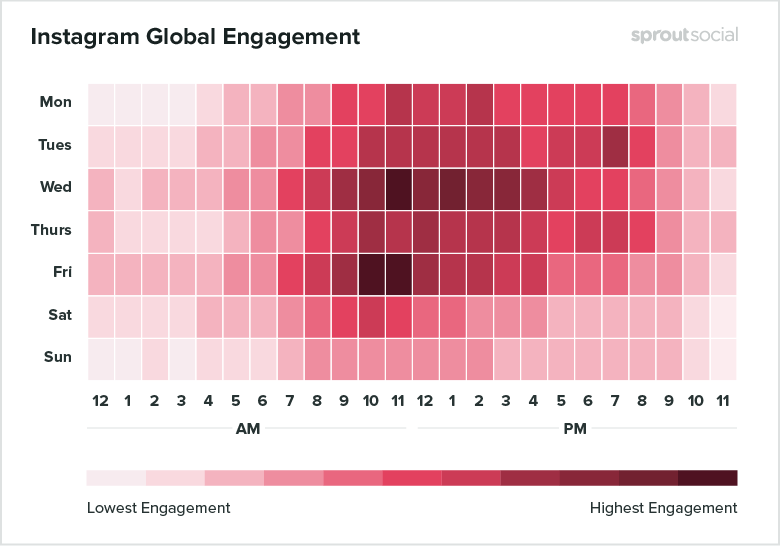
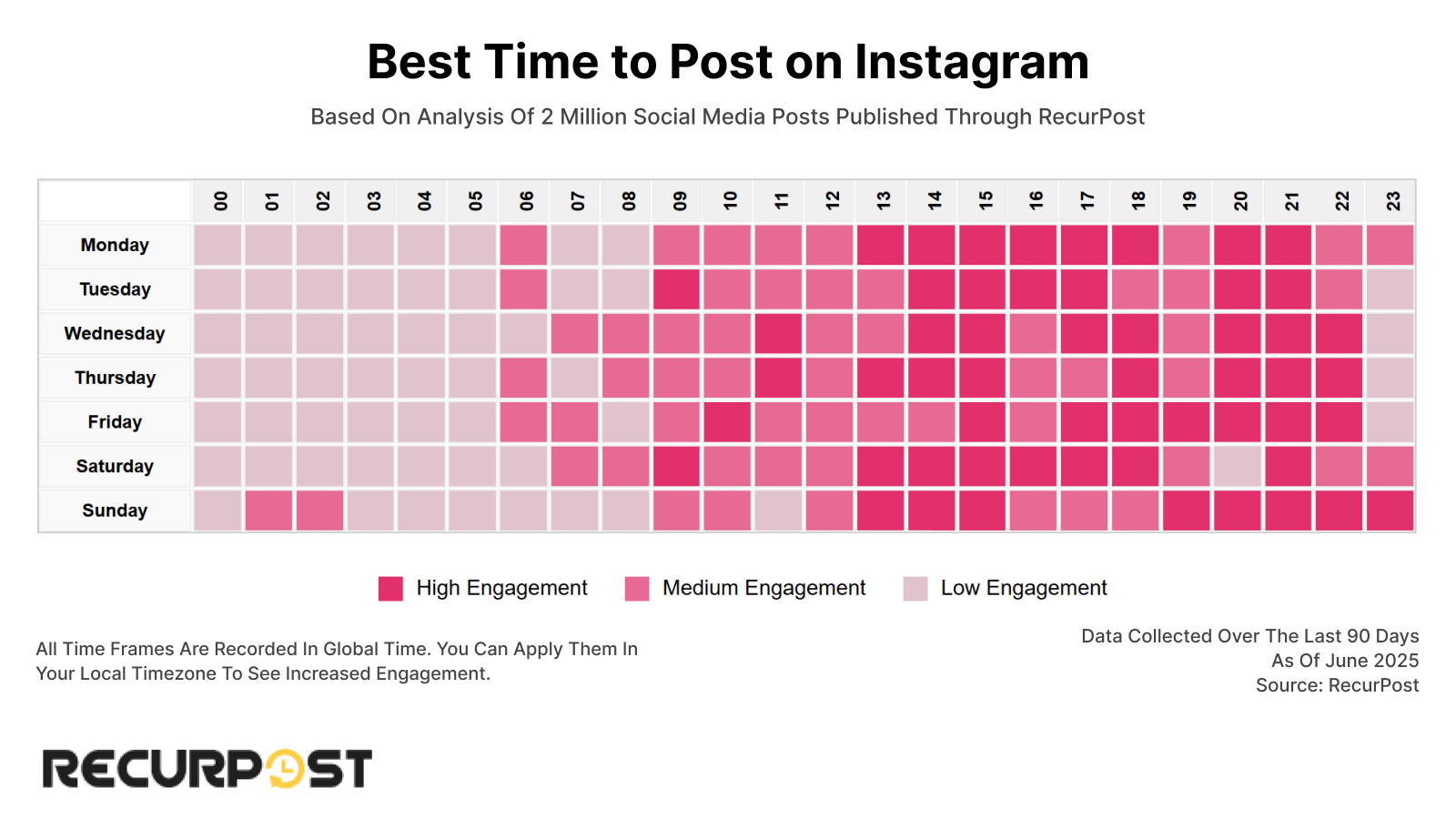
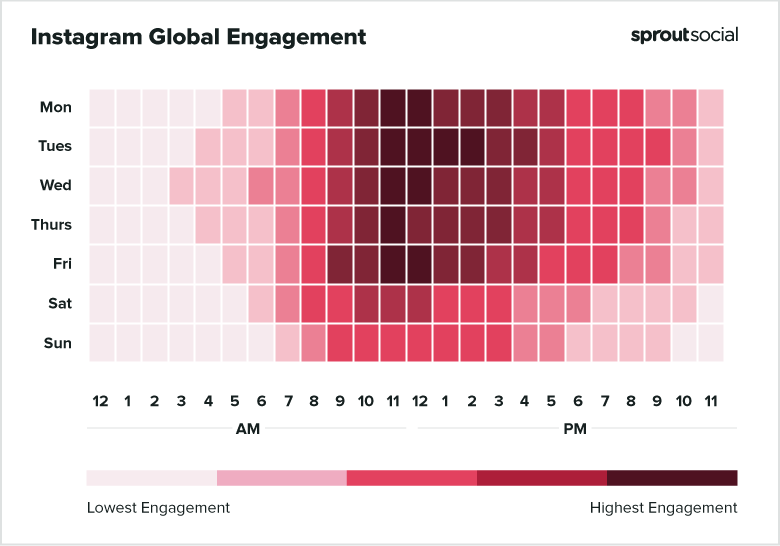
On weekdays, Instagram users are most active early in the morning and late in the afternoon. People check their phones before work, usually between 7 AM and 9 AM. Another busy time is after work, from 5 PM to 7 PM. Posting during these hours can catch users as they scroll through their feeds.
Weekend Activity Trends
Weekends show different patterns. Users tend to wake up later and use Instagram more in the late morning. Peak activity is often between 10 AM and 1 PM. Engagement may also rise in the evening, from 7 PM to 9 PM, as people relax at home.
Time Zone Considerations
Instagram is a global platform. Your audience might be in different time zones. Adjust your posting schedule to fit the most active hours of your main followers. Use Instagram Insights to check where your followers live. This helps you pick the best posting times.
Audience Behavior Patterns
Understanding audience behavior patterns is key to posting on Instagram effectively. People use Instagram at different times for different reasons. Knowing these habits helps you reach more people and get better engagement.
Audience behavior depends on factors like age, location, and lifestyle. These influence when your followers are online and active. Tailoring your posting schedule to their habits can make a big difference.
Daily Activity Peaks
Most Instagram users have specific times of day when they check the app. Morning, lunchtime, and evening often show higher activity. Posting during these peaks increases the chance your content will be seen.
Weekday Vs Weekend Patterns
People behave differently on weekdays and weekends. Workdays usually have steady usage during breaks. On weekends, usage may spread out or peak at different times. Adjusting posts according to the day helps maintain engagement.
Time Zones And Global Audiences
If your followers live in different time zones, timing gets tricky. You must consider where most followers are located. Posting at times that fit several time zones can boost visibility.
Content Type And Audience Habits
Different content types draw attention at different times. Videos may perform better in the evening when users relax. Photos or stories might get more views during quick breaks. Match your content to the audience’s daily rhythm.
Time Zones And Global Reach
Posting on Instagram requires more than just picking a random time. Time zones affect when your audience is awake and active. If your followers live in different parts of the world, timing your posts becomes tricky. Understanding global reach helps you connect with more people.
Think about your main audience location. Posting at noon in New York means it is late night in Tokyo. Few people check Instagram at night. So your post may get missed.
Know Your Audience’s Time Zones
Start by finding where most followers live. Use Instagram’s insights tool for this data. Focus on the top countries or cities. Adjust your posting schedule to match their active hours. This way, more followers see your posts when they are online.
Schedule Posts For Different Regions
Posting at one time may not reach everyone. Try posting at different times for various regions. For example, post once for US followers and once for European followers. It spreads your content and boosts engagement worldwide.
Use Tools To Manage Global Posting
Many apps let you schedule posts ahead. Set times based on your followers’ locations. These tools save time and help keep your posts consistent. Consistency makes your account more trustworthy and active.
Credit: recurpost.com
Content Type And Posting Time
Choosing the right time to post on Instagram depends on the content you share. Different types of posts get attention at different times. Knowing what content you share helps pick the best posting time.
Images, videos, reels, and stories each have unique audience behaviors. Posting times can boost views, likes, and comments. Understanding these patterns improves your Instagram engagement.
Images: Best Times For Static Posts
Simple photos often get more attention during lunch breaks. Around 11 AM to 1 PM, people scroll through feeds. Early evenings, 6 PM to 8 PM, also work well for images.
Videos: Optimal Posting Hours
Videos need more focus from viewers. Posting videos in the evening, between 7 PM and 9 PM, attracts more watchers. Weekends are also good for video content.
Reels: Timing For Maximum Reach
Reels gain quick views during active hours. Post them mid-morning around 10 AM or late afternoon around 4 PM. These times catch users during short breaks.
Stories: When To Share For Quick Views
Stories disappear fast, so timing is key. Post stories early in the day, 8 AM to 10 AM, or late at night, 9 PM to 11 PM. These slots catch users checking updates.
Using Analytics To Optimize Timing
Using analytics helps find the best time to post on Instagram. It shows when your followers are most active. Posting during these times can increase likes and comments. This method lets you avoid guessing and use real data instead.
Instagram provides built-in analytics called Insights. It tracks follower activity, engagement, and reach. By studying this data, you can spot patterns in your audience’s behavior. This makes your posting schedule smarter and more effective.
Accessing Instagram Insights
To use analytics, switch to a business or creator account. Then open the Instagram app and tap the menu. Select “Insights” to see detailed data. This section shows follower demographics and active hours.
Understanding Audience Activity
Check the “Audience” tab in Insights. It reveals days and hours your followers use Instagram most. Focus on the times with the highest activity. These are the moments when your posts can get more attention.
Analyzing Post Performance
Look at past posts and their engagement rates. Compare posts made at different times and days. Notice which posts get more likes, comments, and shares. Use this information to pick better posting slots.
Adjusting Posting Schedule
After gathering data, create a posting plan. Schedule posts during peak follower activity times. Test different times to see what works best. Keep updating your plan based on new insights.
Scheduling Tools For Consistency
Consistency is key to success on Instagram. Posting at the right times helps, but staying regular matters more. Scheduling tools help keep your posts organized and timely. They save time and reduce stress. You can plan posts days or weeks ahead. This helps maintain a steady presence online.
Using scheduling tools lets you focus on creating content. The tools send posts automatically at set times. This keeps your profile active, even when you are busy. Regular posts attract more followers and keep current ones engaged.
What Are Scheduling Tools?
Scheduling tools are apps or software for planning posts. You set the date and time for each post. The tool posts it automatically for you. This means you do not have to post manually every time.
Some popular tools include Buffer, Later, and Hootsuite. They work on computers and phones. Most have free plans with basic features.
Benefits Of Using Scheduling Tools
Scheduling tools help keep a consistent posting schedule. This builds trust with your audience. They know when to expect new content from you.
These tools also let you post at the best times. You can target when your audience is most active. This increases the chance of likes and comments.
You can plan posts ahead. This avoids last-minute rushes or missing days. It also helps balance different content types across your feed.
How To Choose The Right Scheduling Tool
Choose a tool that fits your needs and budget. Check if it supports Instagram posting directly. Look for easy-to-use interfaces and helpful features.
Consider tools that show analytics. These help track post performance and audience activity. This data guides better posting times and content choices.
Try free versions before buying. This helps find the best fit without extra cost.
Credit: blogen.influence4you.com
Frequently Asked Questions
What Is The Best Time To Post On Instagram For More Likes?
Posting between 9 AM and 11 AM on weekdays often gets more likes. People check Instagram during morning breaks and lunch hours.
Does Posting On Weekends Increase Instagram Engagement?
Weekends can bring higher engagement as users have more free time. Try posting around 10 AM to 1 PM on Saturdays and Sundays.
How Often Should I Post On Instagram For Best Results?
Posting 3 to 5 times a week keeps your audience interested. Consistency helps build trust and grow followers steadily.
Does The Time Zone Affect Instagram Post Timing?
Yes, posting according to your audience’s time zone is important. Check where most followers live and post when they are active.
Conclusion
Finding the best time to post on Instagram helps boost your reach. Try different times and track your audience’s activity. Watch when your followers engage the most. Consistency matters; post regularly at the right hours. Remember, every audience is different.
Adjust your schedule based on your results. This simple step can grow your Instagram presence. Stay patient and keep testing. Success comes from learning what works for you. Keep your content fresh and timely to attract more views.