How to Fix Google Adsense Policy Violation? To fix a Google AdSense policy violation, identify the specific issue and follow Google’s guidelines to resolve it. Ensure compliance with all AdSense policies.
Google AdSense is a powerful tool for monetizing websites, but strict policy adherence is crucial. Violations can lead to account suspension or termination, impacting revenue. Identifying and understanding the specific violation is the first step. Google provides detailed guidelines and resources to help site owners correct issues.
Ensure your content, layout, and user experience align with AdSense policies. Regularly review and update your site to maintain compliance. Doing so not only resolves current violations but also prevents future ones. By adhering to these steps, you safeguard your AdSense account and continue to generate revenue without interruptions.
Identifying The Violation
To fix a Google AdSense policy violation, first identify the issue. Knowing the exact problem helps in resolving it quickly. Below are steps to recognize these violations.
Common Violations
Google AdSense has strict policies. Violating them can lead to penalties. Here are some common violations:
- Invalid Click Activity: Clicking your own ads or encouraging others to do so.
- Content Violations: Hosting prohibited content like adult material or copyrighted material.
- Ad Placement: Misleading ad placements that trick users into clicking.
- Traffic Sources: Using traffic from unreliable sources like paid-to-click sites.
Notification From Google
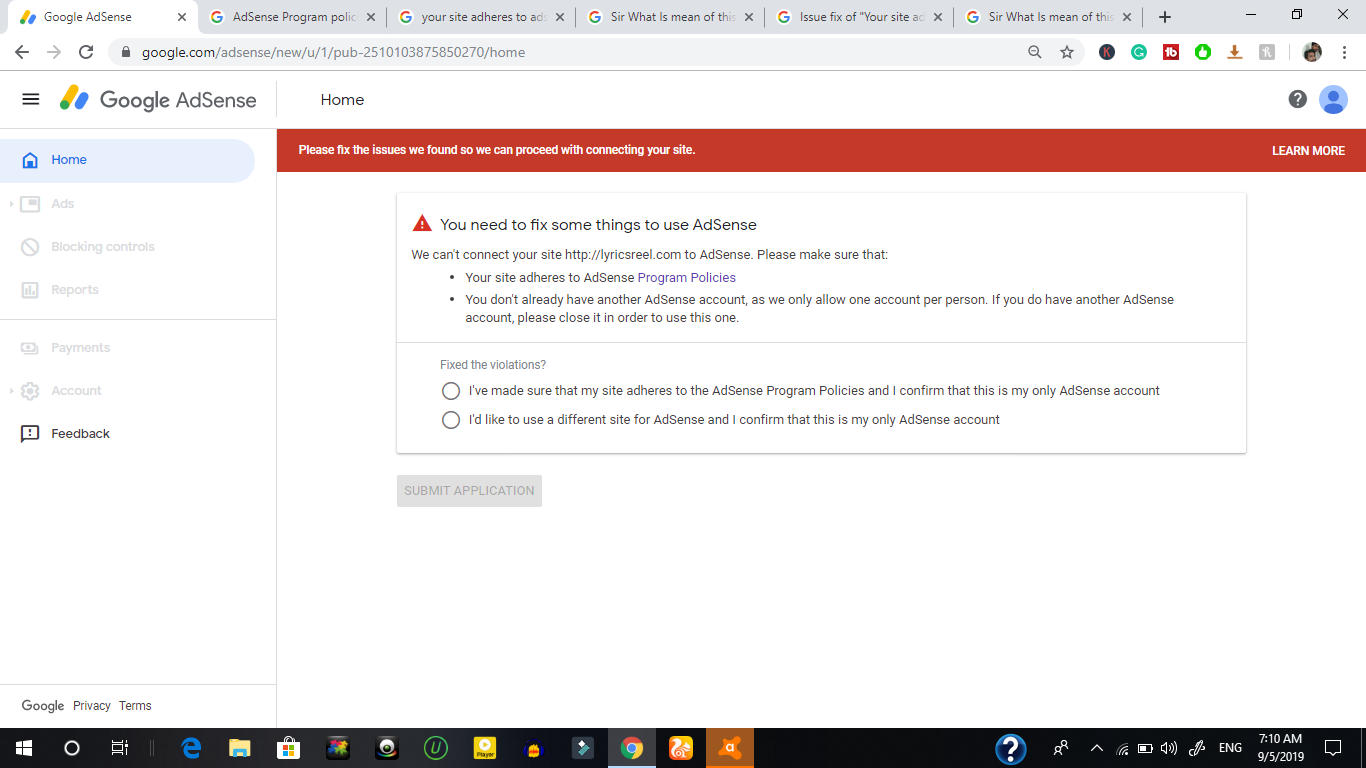
Google sends a notification when a violation occurs. This usually comes via email or in your AdSense dashboard.
| Notification Type | Details |
|---|---|
| Google sends an email with details of the violation. | |
| AdSense Dashboard | A notification appears in your AdSense account. |
Check the email and the dashboard regularly. This ensures you catch violations early. Once you get a notification, read it carefully. It includes details about the violation and steps to fix it.
Understanding the violation helps in resolving it faster. This keeps your AdSense account active and in good standing.

Credit: m.youtube.com
Analyzing Your Site
Analyzing your site is crucial to fixing Google AdSense policy violations. This step helps you identify the root cause of the issue. It involves checking your content, ad placement, and overall site structure. Let’s dive into the specifics to get your site back on track.
Reviewing Content
Start by examining your site’s content. Ensure it aligns with Google AdSense policies. Look for any content that might be offensive or inappropriate.
- Check for copyrighted material.
- Ensure your content is original and adds value.
- Remove or revise any misleading information.
Use tools to check for duplicate content. Tools like Copyscape are helpful. Quality content is key to maintaining AdSense compliance.
Checking Ad Placement
Incorrect ad placement can lead to policy violations. Review your site’s ad layout. Ensure ads are placed properly.
- Ads should not be near clickable elements.
- Ensure ads do not block content.
- Avoid placing ads in pop-ups or pop-unders.
Google has strict rules about ad placement. Ad placement must not deceive users. Use Google AdSense guidelines for reference.
A table can help you track ad placement issues:
| Page | Ad Location | Issue Identified | Action Taken |
|---|---|---|---|
| Homepage | Top Banner | Near Navigation | Moved Below Navigation |
| Blog Post | In-Content Ad | Blocks Text | Adjusted Position |
Regularly reviewing ad placement helps avoid future violations. Use these tips to keep your site in compliance.
Corrective Actions
Facing a Google AdSense Policy Violation can be daunting. Taking corrective actions is vital to regain compliance. This guide will help you understand how to fix these issues step by step. Follow these instructions carefully to ensure your account remains in good standing.
Making Necessary Changes
First, identify the source of the violation. Google AdSense provides details in their notification. Pay close attention to these details. Common issues include:
- Invalid traffic
- Content policy violations
- Ad placement issues
Once you know the problem, take the following steps:
- Review Your Content: Ensure all content adheres to AdSense policies.
- Remove or Modify: Fix or delete content that violates rules.
- Check Ad Placement: Ensure ads are not placed in restricted areas.
- Monitor Traffic: Avoid buying traffic from suspicious sources.
Ensuring Compliance
After addressing the immediate issues, make sure your site remains compliant. Regular checks and balances can help. Consider the following tips:
- Regular Audits: Schedule monthly reviews of your site.
- Stay Updated: Follow updates on Google AdSense policies.
- Quality Content: Focus on producing high-quality, original content.
- Proper Ad Placement: Place ads where they do not disrupt user experience.
Regular compliance checks can prevent future violations. Use tools and plugins to help monitor your site’s content and traffic. Consistency is key to maintaining a healthy AdSense account.

Credit: incomesecrets.medium.com
Submitting An Appeal
Submitting an appeal for a Google AdSense policy violation can be daunting. But with proper preparation, you can turn the situation around. Here’s how you can submit an appeal effectively.
Preparing Your Appeal
Before submitting your appeal, gather all relevant information. Make sure you understand the specific violation. Read Google’s policy guidelines thoroughly.
Here are some steps to prepare your appeal:
- Identify the exact policy violated.
- Collect evidence to support your case.
- Correct any issues on your website.
Use the Google AdSense Help Center to find resources. Consult their guidelines to ensure compliance. Take screenshots of any fixes made.
Craft a clear and concise appeal letter. Include these key elements:
- Explanation of the violation.
- Steps taken to resolve the issue.
- Request for re-evaluation.
Keep your tone polite and professional. Avoid blaming Google for the violation.
Follow-up Steps
After submitting your appeal, be patient. Google takes time to review appeals.
Track the status of your appeal via your AdSense account. Check your email for updates from Google. Stay proactive in monitoring your account.
While waiting, continue improving your site. Ensure all content complies with AdSense policies. Regularly update your website to maintain quality.
Document any changes made during this period. If needed, you can reference these in further communications.
If your appeal is denied, don’t lose hope. You can submit another appeal. Make sure to address any feedback from Google. This increases your chances of approval.
Remember, a well-prepared appeal demonstrates your commitment to compliance. It shows you value your partnership with Google AdSense.
Credit: support.google.com
Frequently Asked Questions
How Do I Dispute A Google Ad Policy Violation?
To dispute a Google ad policy violation, go to the Google Ads Help Center. Select “Dispute a Policy Decision. ” Follow the instructions, providing necessary details and documentation. Submit your request for review.
What Happens After A Policy Violation Google Ads?
After a policy violation in Google Ads, your ad may be disapproved. You will receive a notification with details. Fix the issue and resubmit the ad for review. Repeated violations can lead to account suspension. Always follow Google’s advertising policies to avoid disruptions.
How Do I Fix My Adsense Problem?
Check your AdSense account for policy violations. Ensure your website complies with AdSense guidelines. Resolve any errors or issues. Contact AdSense support for help.
Conclusion
Fixing Google Adsense policy violations is crucial for maintaining your revenue stream. Follow the guidelines, review policies, and make necessary adjustments. Stay proactive by regularly checking your account. This ensures compliance and helps avoid future issues. Remember, a well-maintained Adsense account contributes to your website’s success and profitability.